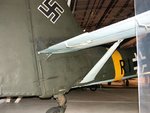
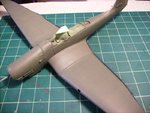
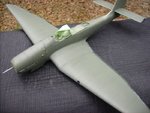
****DONE: 1/32nd Ju87G-2 of Fw Josef Blümel, 10(Pz.)/SG-3, S7+EN Group Build

Ad: This forum contains affiliate links to products on Amazon and eBay. More information in Terms and rules

Wayne said:
fire away man! See if i can help!

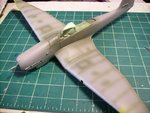
Some advice here Wayne, should I now change up the color alittle bit to add to the fading look??? Put a couple of drops of flat black into the RLM 71 and shoot it again???

Or will it just deepen after the second and third coat??? Problem I have is that the elevators were sprayed my regular old way, and I didnt think think about this before... I know Ill have to run over them again with a slightly shaded color to try and get the effect of what Im doin with the rest of the model...
119301.jpg


Then of course on this page is the ongoing debate about my canopy not sitting correctly when open, kida at a loss as to how to "fix" the problem...

And I still cant find a site online that actually sells a replacement canopy....

HELP!!!
 
A couple of suggestions Dan.
1) Try what I suggested by altering the kit canopy.
2) Prefered. Use the kit canopy, just sitting in place in the closed position for now. (not glued). Then, take the measurements, and draw a plan of the canopy's elevations, front, top, side and back, using the kit part as a pattern. Make the drawings of the front and rear ends by tracing around the inside, then send it all to me (not the canopy itself). I'll see how I get on making a mould and moulding one for you.
How's that sound?
 
Some advice here Wayne, should I now change up the color alittle bit to add to the fading look??? Put a couple of drops of flat black into the RLM 71 and shoot it again???

Or will it just deepen after the second and third coat??? Problem I have is that the elevators were sprayed my regular old way, and I didnt think think about this before... I know Ill have to run over them again with a slightly shaded color to try and get the effect of what Im doin with the rest of the model...
119301.jpg


Then of course on this page is the ongoing debate about my canopy not sitting correctly when open, kida at a loss as to how to "fix" the problem...

And I still cant find a site online that actually sells a replacement canopy....

HELP!!!

Ok from the single pic (On my monitor) it looks a little pale to me, either a little too much fading or it appears a bit washed out ...light maybe?i A couple more pics from 4 and 8 o'clock would help give a better opinion.

In the mean time for consideration...first off if it is a little light I would use the original RLM 71 (without the black) thin it down and lightly run along the panel lines first, maybe a couple of light passes, dont want it to be heavy at all. Then a very light misting within the panel lines to sort of blend the panel lines and fading just a tad. the light misting is just that you dont want to eliminate the effect. If you go a little too far you can reapply the fading colour..again thinned and a light misting application.

The canopy......well I would spend a little time on that one....cause the wrong method and your f#cked...broken canopy. I think the couple of suggestions already given are good ones to consider.....

I have purchased parts from Hobbylink Japan a couple of times when I have needed them. The issue for a canopy would be time to get one as they would order it from Hasegawa then forward it on when available, see the link.
HLJ Help Page / Frequently-Asked Questions
 
Thanks guys, thanks alot.....

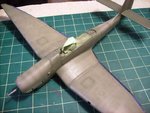
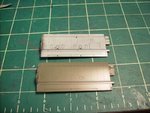
Wayne, what u see in the one pic is the original Modelmaster RLM71 thinned down 1 part paint, 3 parts thinner... I did 2 runs of tapping the paint, over and over and over on the panel lines, real light so no running... The 2 panels for fuel tanks got more attention, 4 passes, to hid the putty...

The inside of the rest of the panels got one pass of the tap tap tap paint method... No runs....

I wanted to wait to hear from u before I did any more...

Heres some more pics....

Terry, man I appreciate the offer... Wouldnt it be easier just to send u the canopy???

I had a slight injury at work and its kinda hindering me a bit, but I should be able to get some things done this weekend......
 

Attachments

  • glossy 014.jpg
    glossy 014.jpg
    105.2 KB · Views: 121
  • sonday 025a.jpg
    sonday 025a.jpg
    101.6 KB · Views: 123
  • sonday 011.jpg
    sonday 011.jpg
    112.7 KB · Views: 116
Ok, now that looks much better in terms of the blended effect, but the paint itself just doesn't look right to me in terms of the colour itself ? not sure quite how to put it....is it the paint or the lighting that's making me see an issue.....not trying to rain on your work at all though....
 
I see what you mean about the paint Wayne. it seems to be more of a grey - towards RLM 02 - than green. Maybe it's just because it's so thin. £ thinner to 1 paint seems a lot to me, but it obviously works. maybe it's just thinning the colour a lot.
Dan, I don't really need the canopy, although it would help to check the profile. I just need a trace of the inside of each end, and the same along the base, each side, with the side elevation profile too, to scale. That way, at least you can have a complete model, with the canopy in place, closed for now, until i can make one. It takes a good two to three days for the male mould to harden once varnished and polished, before it can be used to mould the clear sheet, so realistically, from you sending the drawings, to you receiving a canopy, would be about two weeks, maybe more.
If you'r not quite sure exactly what I need, let me know, and I'll e-mail you some pics to demonstrate.
 
Dan, your in good hands man

Wayne, HLJ is a good link, I've used them often myself for the more obscure modelling bits and tools not to mention Tamiya Masking tape without the costly dispenser.

:hotsun: :hotsun:
 
It could be the lighting, but u can see the color on the elevator alot better...

If that color green looks incorrect, what do u think I should add to it to make it alittle closer..... Im not sure what it SHOULD look like...

Ive been mixing my paint at that ratio since I started with an airbrush Terry.... Do u recommend a different mix ratio??? I agree it is quite thinned out....

Im feeling rather pissed off at the moment....

Ill try and get the canopy situation squared away tomorrow, Ill get back with u on it, thanks again...
 
Ah, now they look more green in that last shot. maybe it was just the angle or the lighting making it look grey-green before. Normally I mix at around 50/50, sometimes 60% thinner, 40% paint, very rarely, if ever, thinner than that (using enamels BTW). That said, I don't actually measure it accurately, it's more of a 'by feel' sort of thing. When the viscosity looks right, and the mix runs down the side of the little plastic tub I use looking the same as milk would (flowing, not colour!!), then I know it's about right. If it isn't, then I add thinner or paint as required, just a touch at a time. If I want a thin coat, I just do it by holding the 'brush further away!
Really technical, innit?!!
When I need to make a green more 'green', in the terms of Luftwaffe, RAF and US greens, I normally add either a spot or two of Dark Green (Humbrol 30, the one I use for RAF cammo), or an Olive Drab, or a spot of Dark Earth (Humbrol 29) until it looks right. To make it lighter, but without going more towards a pale green or sage colour, then it's yellow, sandy brown or Dark Earth, or a mix of these, and maybe, just a tiny spot or two of white.
 
Hate to be a party pooper...but I'm still not satisfied with the colour, still too light and not dark or 'Green' enough for my liking...Sorry Dan. STILL your call on proceeding as is though.

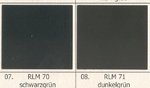
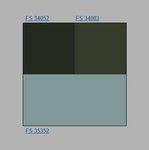
RLM 71 is a 'Dark' Green see below...

Sources : IPMS Stockholm site FS approx. equivalents and Luftwaffe Camo and Markings Ken Merrick Colour chip card.

While 70 is a Black Green and Very Dark, 71 IS lighter and quite often represented as a Medium to Dark Green and in some cases...easily seen on B/W photos while in others you can't pick the difference.
 

Attachments

  • RLM 70  71.JPG
    RLM 70 71.JPG
    24.8 KB · Views: 139
  • RLM 70 - 71 - 65.jpg
    RLM 70 - 71 - 65.jpg
    4.7 KB · Views: 150
Last edited:
The 2 colors swatches are slightly different Wayne, the one above seems to have more olive in it...

That bein said, the color seems to be close on my end... I took the elevator and put it up to the screen here and its damn close.... Might need to be darkened a slight bit....

Recommendations Wayne on getting the color closer??? I know Terry recommended dark green or earth to bring it down a notch... I would assume its just a couple drops to darken it down??? Im not experienced at changing the tonality of enamel paints...
 
OK, so here it is, not 100%, but several passes later with some slightly darkened Model Master Enamel RLM71... Ive been using ur method for splotch painting/weathering Wayne, or atleast my intereptation of it lol...

Inside and outside....
 

Attachments

  • camoup 017.jpg
    camoup 017.jpg
    96.5 KB · Views: 115
  • camoup 025.jpg
    camoup 025.jpg
    105 KB · Views: 123

Users who are viewing this thread

Back